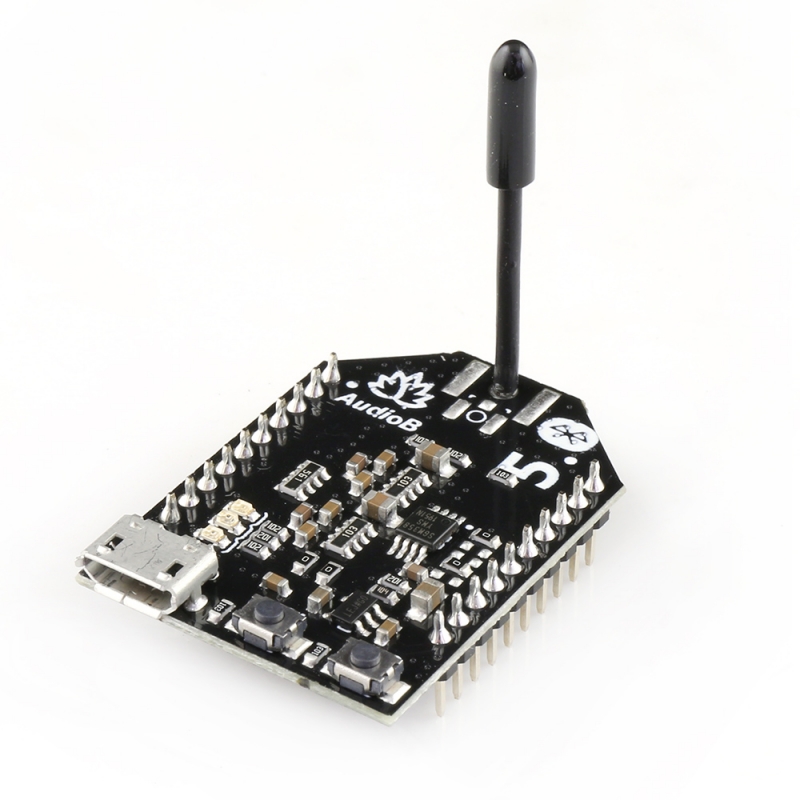
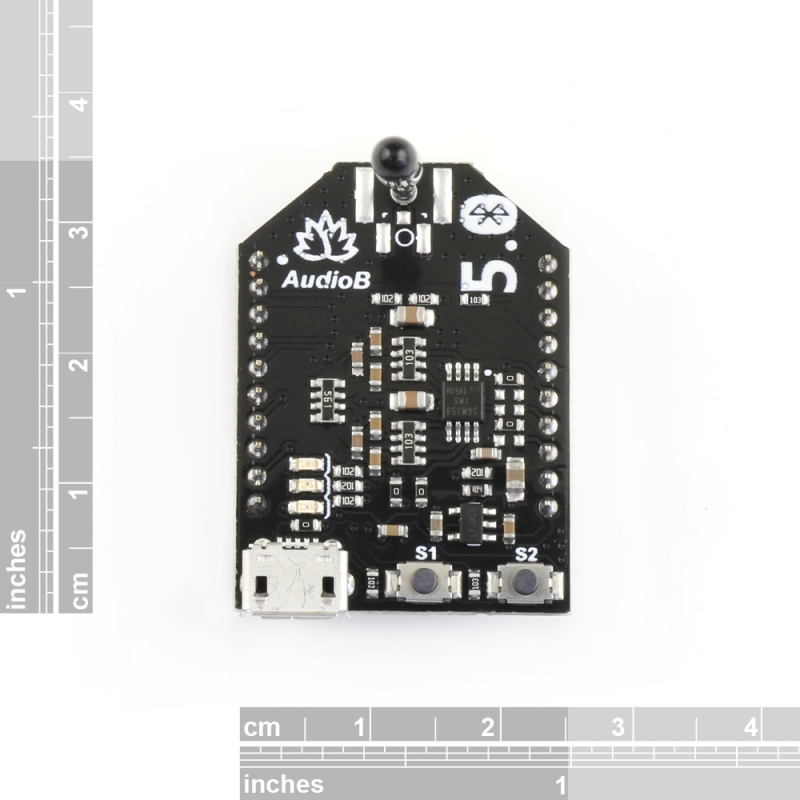
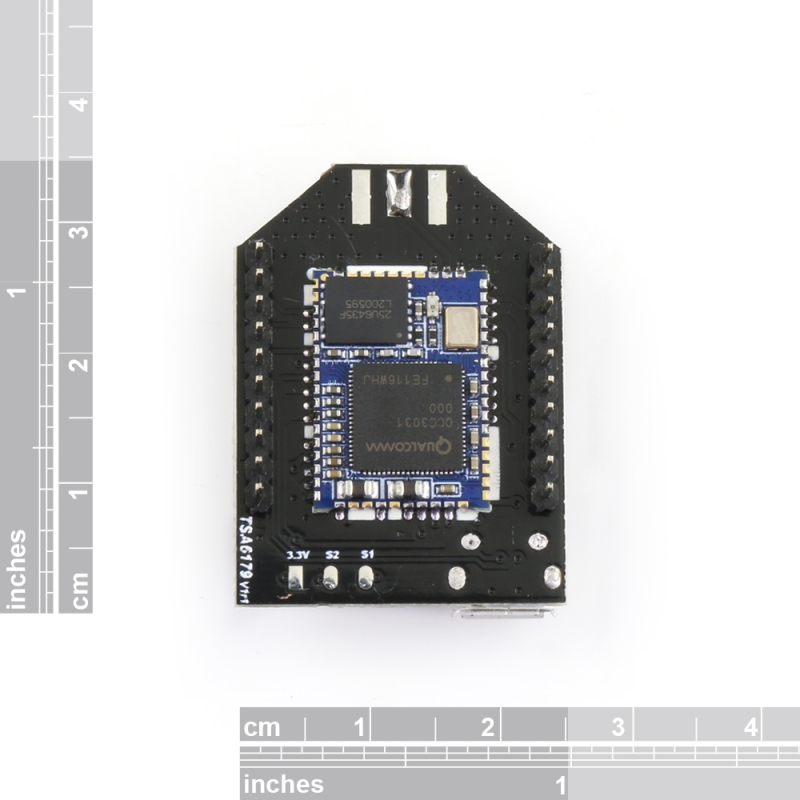
TSA6179 is a Bluetooth 5.0 stereo audio module based on QCC3031. We break out the pins into 2×10 male pins with 2mm spacing so you can easily integrate them into your project. This module has a micro USB port, meaning you can change the firmware yourself. Two buttons on the module can be configured to have different functions as needed.
TSA6179 is a Bluetooth 5.0 stereo audio module based on QCC3031. We break out the pins into 2×10 male pins with 2mm spacing so you can easily integrate them into your project. This module has a micro USB port, meaning you can change the firmware. Two buttons on the module can be configured to have different functions as needed.
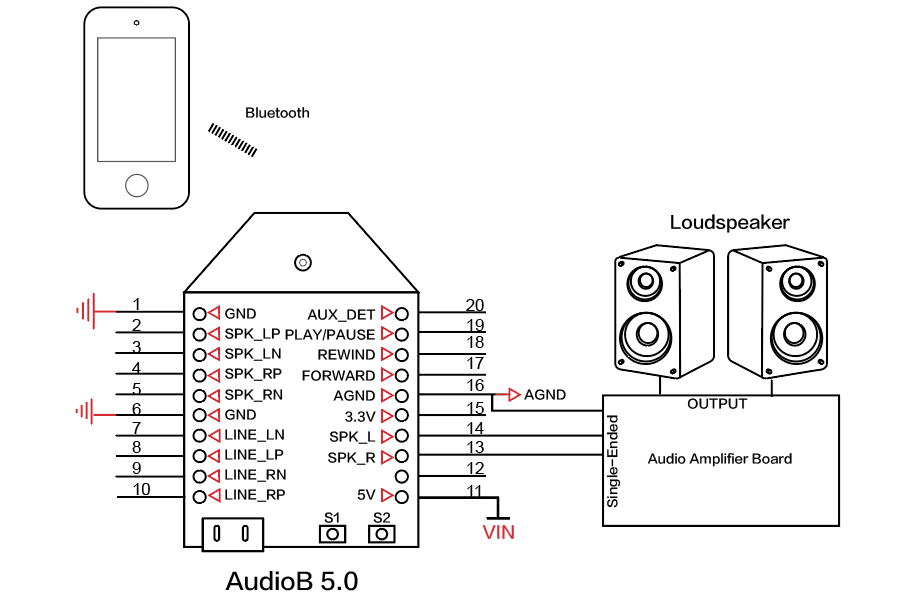
Single-ended signal output
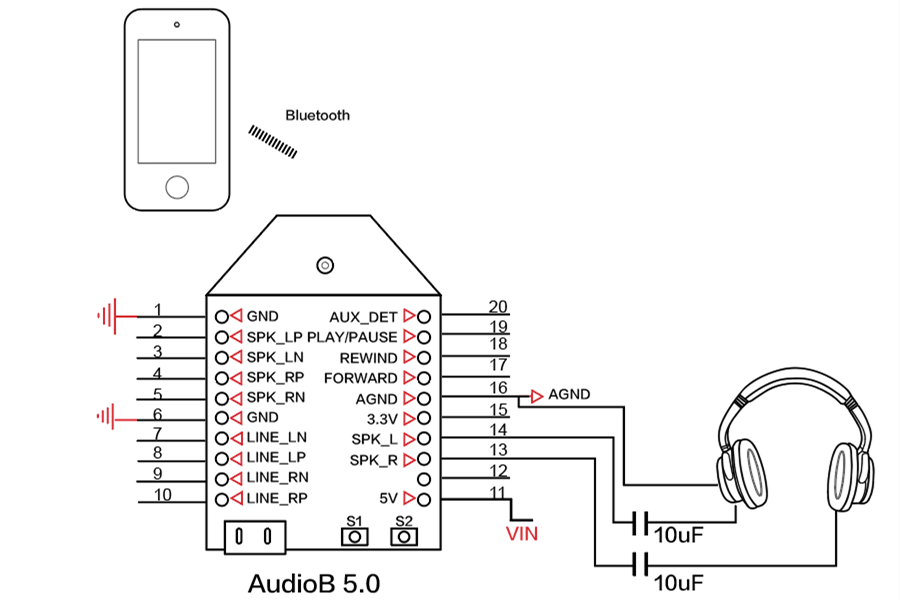
Single-ended signal output with headphone/small speakers
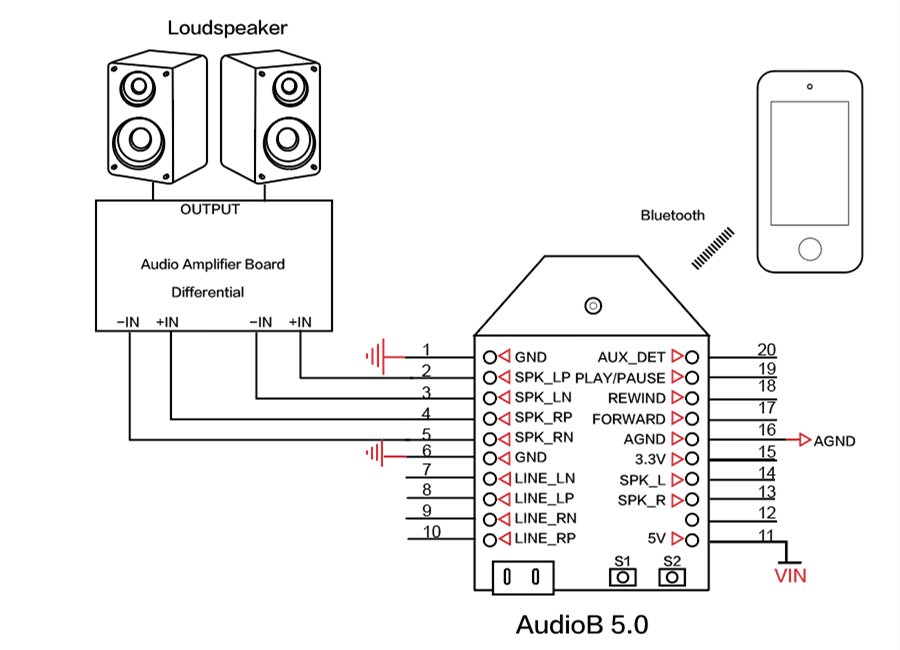
Differential signal output
TSA6179 offers two firmware options: TWS mode and Party mode (Multipoint). You can also update the firmware via the micro USB port.
TWS mode: The module works as a Bluetooth stereo audio receiver and can be plugged into most of our amplifiers.
Party mode (Multipoint): Multiple modules can be paired and work together, enabling the creation of a wireless surround sound system.
How to Use:
TWS mode
Power up the module and wait 1 second. The module enters pairing mode, with the Blue LED and Red LED flashing alternately. (Voice: Pairing)
Now, your smartphone can find a new Bluetooth device named “TSA6179”. Connect to it.
You can play music now. If you use only one module as a standard receiver, you don’t need to perform the following steps.
TWS connection
Master module: Press S1 to set the master module into TWS master mode.
Slave module:
Power up the slave module, then press S2 to set it to TWS slave mode.
The master module will automatically search for the slave module for 30 seconds. Both the master and slave modules will be connected. (Voice: Pairing successful)
The master module and slave module can play music together now.
Party mode
Power up the module and double-click S1. The module enters pairing mode (Voice: Pairing, LED: Blue LED fast blinking).
Now, your smartphone can find a new Bluetooth device named “TSA6179”. Connect to it.
You can play music now. You don’t need to follow the following steps if you use only one module as a normal audio receiver.
Multipoint connection
Master module: Click S1 to set the master module to transmitter mode (Voice: broadcast mode, LED: Red LED on).
Slave module:
Power up the slave module, and click S2 to set it into receiver mode (Voice: broadcast audio enabled, LED: green LED on).
Double-click S2 on the master module, then double-click S2 on the slave module. The master module will automatically search for the slave module for 30 seconds.
Once the master and slave modules are connected, they can play music.
If a new board is to be joined as a module, click S2 to set the new module to receiver mode, then double-click S2 on the master module.
If a slave board wants to quit, click S1 to switch that module to the transmitter or normal modes.
Features:
Bluetooth 5.0
Multipoint connection
Qualcomm CVc audio technology
Qualcomm TrueWireless Technology
Stereo receive
Effective transmission distance: 50-100m
Reviews
There are no reviews yet.
Only logged in customers who have purchased this product may leave a review.
Shipping Policy
Fast Delivery! We ship via USPS, UPS, DHL, or FedEx because they're fast, reliable, and easy to track. We process orders within 24 hours, and delivery may take 4-7 working days, depending on your location. We'll email you the tracking info once we ship your order. We sell in USD.
Tariff: To minimize or avoid high tariffs, we ship from the country where the product is made, such as China, Italy, Taiwan, Canada, or Europe. If applicable, you will pay the tariff in your country before delivery. Your order total does not include a tariff.
Product Support: You don't need to contact our manufacturer or supplier for support before or after your purchase. We'll help you resolve any technical issues. We answer emails with real people, not AI, chatbots, or community forums!
Ships From: On this product page, check the Ships From: label to see which country the product ships from. We do not ship all of our products from the USA, except for products made in the USA or in stock. We ship most products from regions such as China, Italy, Taiwan, and Europe, as well as other countries. Therefore, tariffs depend on the country of origin, as not all countries charge the same rate. For example, if the US imposes a 30% tariff on goods from China, in contrast, other countries may impose a lower tariff or none at all.
Tariff vs. Shipping Fee: Please don't confuse the shipping fee with the tariff, because they are two separate charges. You pay us a shipping fee for the carrier to deliver your order to your door. You pay the tariff to the customs office, a branch of your government, as an import tax.
Why aren't we adding tariffs to the product's retail price? If all countries imposed the same tariff amount and used the same currency, we would have added that tariff to the product's retail price. Our suppliers and we are not responsible for tariffs. Please shop accordingly.
Shipping Costs: For some products, we calculate shipping fees based on weight and package size. Some items ship with batteries, which require special delivery for safety and result in a slightly higher cost. For lower shipping costs on multiple items or bulk orders, please email us the product link, quantity, country, state, and ZIP code so we can help lower the shipping cost. Thank you.
Attention! We'll email you the tracking number so you can follow your parcel. The shipping company will contact you by phone, text, or email to arrange payment of the tariff on their website. As the customer, you're responsible for responding to their calls, texts, or emails. You can also use the tracking number link we emailed you to contact the shipping company or pay any applicable tariffs online, if you haven't already done so.
Heads Up! We're not responsible if the shipping company returns your parcel to the country of origin because of unpaid tariffs or non-compliance with its requirements. As a result, you will be responsible for the reshipping costs, applicable tariffs, and an additional 20% service fee. We will not accept any excuses for failing to follow up with the shipping company regarding the tariff, and we will not issue a refund.
Please check your SPAM folder! To provide you with delivery information, we will add your email address to the shipping website so you receive delivery notifications until your parcel reaches your shipping address. Please always check your spam folder to ensure you receive emails from Oz Robotics, USPS, UPS, DHL, and FedEx. Please let us know if you don't want us to enter your email on the shipping company website.
Return Policy
5 Hours: If a mistake occurs during purchase, you have 5 hours to request a refund for any reason, including if you don't want to pay the tariff. However, Stripe will not refund its processing fee if you cancel your order; therefore, we cannot refund it.
All Sales Are Final: After 5 hours, we can't cancel your order with a refund because order cancellations incur multiple transaction processing fees from Stripe and PayPal, additional shipping fees, reverse tariff payments, and paid ads, all of which are costly and time-consuming. For technical issues, we'll help you resolve the problem and provide a replacement if you can prove the product has a manufacturing defect.
Exchange Policy: We want you to be happy with your new purchase. However, once you have used the product, we can't issue a refund, but we will offer an exchange for a product with irreversible manufacturing defects or technical issues. If you purchased the wrong product, then you will be responsible for the reshipping fees and tariffs. If the product is defective, please email us ASAP with photos or a video of the faulty part so we can evaluate the issue before arranging a replacement.
Privacy Policy
Oz Robotics does not collect personal data from customers or visitors; it collects only the data shown on the user profile screen for registered users.
Terms and Conditions
Delivery Date/Time: If the shipping company can't deliver your parcel because you weren't at your delivery address on the scheduled date/time, that is not our fault. If the carrier returned your parcel to the manufacturer from the country where it was shipped, that is outside our control. Therefore, you will be responsible for paying the re-shipping cost and any applicable tariff for any re-shipment request. In such a case, we will not issue a refund.
We know that some customers place an order and then go on vacation. Please note that since Donald Trump ended the $800 de minimis exemption, low-value international shipments no longer enter duty-free. All incoming packages of $800 or less, even for a product costing $1, are now subject to regular country-specific import duties, processing fees, and full customs checks. So even if you are on vacation, you will need to watch your email, phone calls, and texts to pay the tariff before it is delivered to your shipping address.
Warranty: We cover problems caused by manufacturing defects, not those resulting from faulty repair attempts, misuse, or customer accidents.
Shipping costs
Method Name
Region / Country
State
Postcode
Cost
Standard Shipping
Any
Any
Any
$28.00
We offer World-Class Customer Support. You don't need to contact our manufacturer or supplier for support before or after your purchase. We'll help you resolve any technical issues you may have. We reply to your email with Real People, not AI, chatbots, or community forums! Thank you for visiting Oz Robotics.





















Reviews
There are no reviews yet.