
Oz Robotics Shipping System
Oz Robotics provides two complete per-product shipping systems. Per product, Shipping means that the Shipping is applied to that particular product. This ensures that vendors receive the correctly calculated Shipping in their commission. The two systems are as follows:
- Table Rate Shipping Method
- Flat Rate Shipping Method
Table Rate Shipping Method
Table rate shipping provides much finer-grained control over shipping costs. You can create as many entries as possible to offer close-to-shipping zone-like functionality. Shipping rates can be set using the following details.
- Country / Region / Everywhere else
- State
- Post/Zip Code (Single, Range, and Wildcard)
- Fee
- QTY Override (charge the shipping fee only once, no matter the product quantity count)
Entries are checked in the order listed in the table; the first entry is checked first, then the next, and so on. Only Country and fee are required for the payment to be triggered. All other settings are optional.
Regions or Continent-based Shipping Fees
In the table rate, we supported Shipping to regions and continents. The shipping calculation will apply to all countries in that region or continent. If you want to set a shipping fee for a specific country in that region, add a new row, select the Country, and enter the cost.
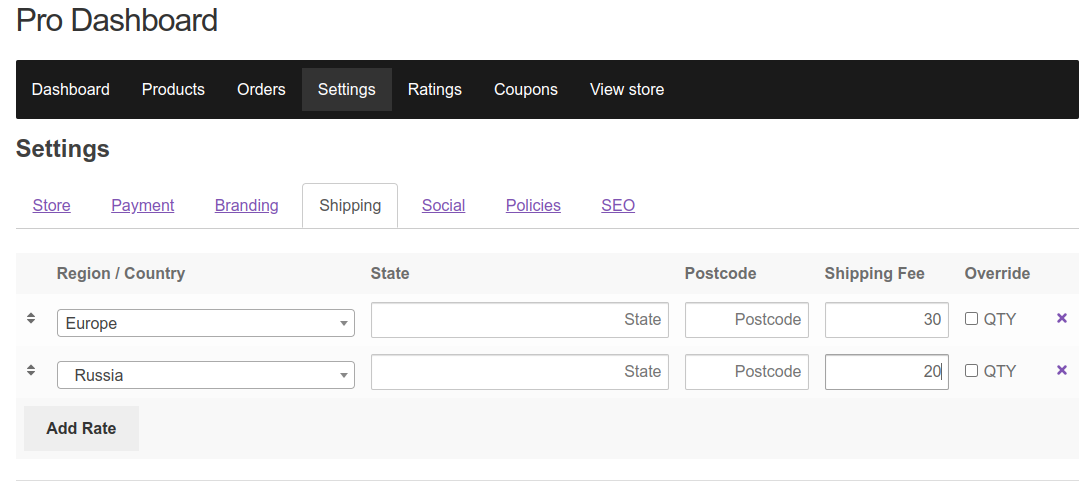
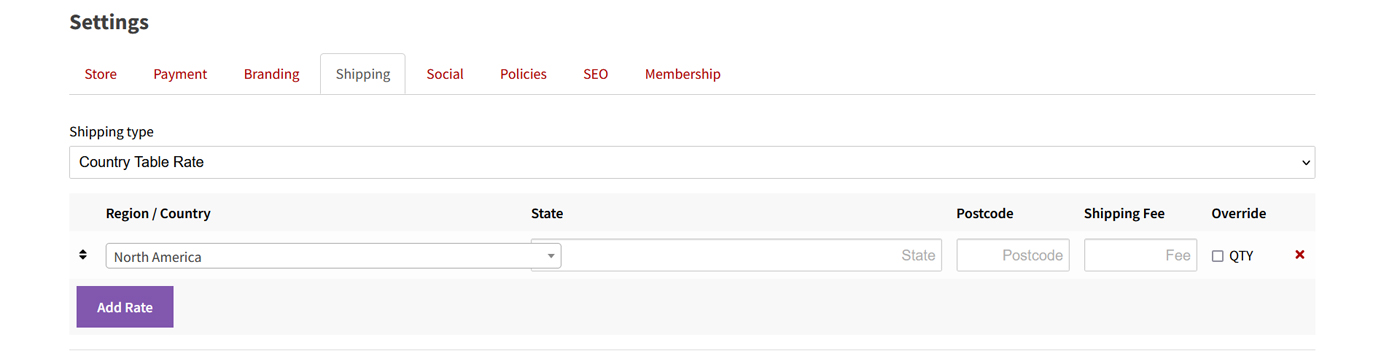
Everywhere Else
There is an option called Everywhere Else. This allows the vendor to set a rate for the countries they need and then for ‘Everywhere else.’
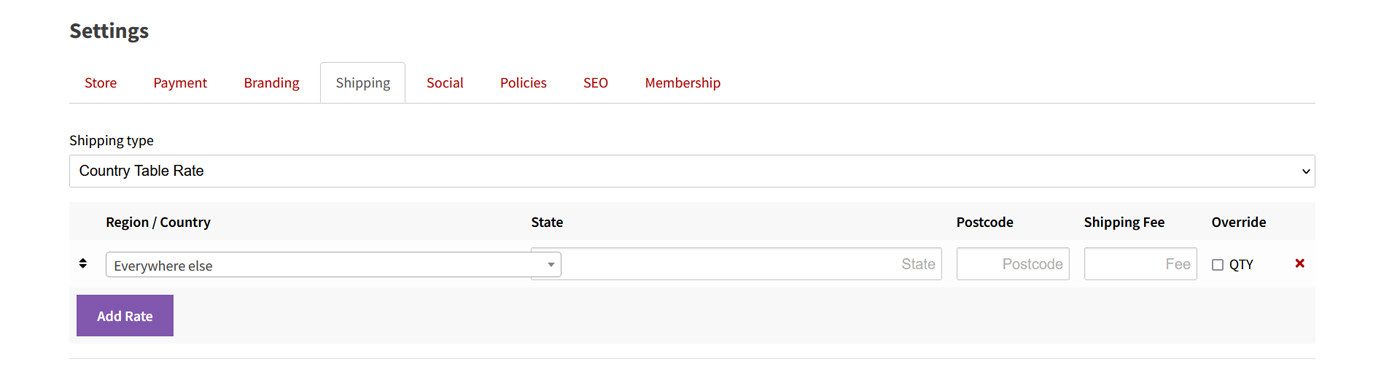
Important Notes: Vendors must set their shipping address to ensure vendor shipping works correctly. If vendors have not set their store or Shipping address, you will get the “No shipping methods found” message.
Per Product Shipping
The Oz Robotics Vendor shipping system is per-product. This means that all shipping settings apply to products individually. Although we have vendor store-level fees, they are generally used on a per-product basis.
- For example, if you set your national flat rate to $10 and add two products from the same vendor, the total Shipping will be $20.
- This means the shipping rate is applied per product at checkout, so every vendor’s product will have a shipping rate. This is not set at the order level.
- You must use the flat-rate system to provide maximum, minimum, or free shipping fees at the vendor’s store level.
Flat Rate Shipping Method
Enabling this will provide a shipping dropdown on the vendor’s settings page under the shipping tab.

The flat rate has national and international options; this applies to all levels and the following options.
- Shipping fee
- QTY Override (charge the shipping fee only once, no matter the product quantity count)
- Free Shipping nationally or internationally
- Minimum and Maximum shipping charges per rate (national/international)
- Free shipping orders over
- Turn off this method (stop national or international Shipping from being available)
Minimum, maximum, and free shipping thresholds
Oz Robotics allows vendors to set minimum and maximum shipping fees and offer free Shipping when they spend over a specified amount. These can be placed at the product, store, or global level. This is the only part of our shipping system that operates at the product and store levels. This is because product-level thresholds apply to the product, while store-level thresholds apply to the entire vendor’s order.
- Minimum – The minimum shipping fee that will apply
- Maximum – The maximum shipping fee that will apply
- Free Shipping – Free Shipping applies when the customer spends over this amount.
Product-level thresholds apply to that specific product. Likewise, store-level thresholds apply to the vendor’s order as a whole. Both of these thresholds are checked when Shipping is calculated. That means if a threshold is triggered at the product level, that product’s Shipping and spending will be used in the order calculations.
Shipping threshold calculation example
Product A costs $25, with shipping costs set at the product level
| Rates | Cost |
|---|---|
| National shipping rate | $3 |
| National minimum shipping rate | $10 |
| National maximum shipping rate | $50 |
| National free shipping spend | Not set |
Product B costs $34, with shipping costs set at the store level
| Rates | Costs |
|---|---|
| National shipping rate | $9 |
| National minimum shipping rate | Not set |
| National maximum shipping rate | Not set |
| National free shipping spend | $99 |
The Customer Cart Shipping Calculation steps
The following shows the shipping system performing calculations to determine rates for a vendor store, including threshold checks.
Step One: Check the per-product shipping rates at the product, store, or global level.
3x Product A – shipping cost for Product A is $9 ($3 x 3 )
5x Product B – shipping costs for Product B are $45 ($9×5)
Cart total spend – Product A – $75, Product B – $170 – $245
Total Shipping before threshold checks $54
Step Two: Run threshold checks
Threshold checks Product A for $10 because the $9 rate does not meet the minimum shipping cost. In addition, threshold checks for the order will trigger free Shipping because the vendor order costs $245.
3x Product A – The shipping cost for Product A is $10
5x Product B – shipping costs for Product B are $45 ($9×5)
Cart total spend – Product A – $75, Product B – $170 – $245
Total Shipping after threshold checks $FREE




















