
Frequently Asked Questions for Suppliers
Your vendor username should be your company name. Do not use your personal name, email address, initials, or abbreviations as your ‘username’ because they are not marketable and will be rejected and deleted.
Product image size: Each product image must be at least 640px in height.
You can add up to 6 images per product. 1 featured image, and up to 5 Gallery Images.
Required product image size: Each product image must be at least 640px in height
- Vendor Store Banner Size: Width: 1920px, Height: 400px, Format: .jpg or .png
- Vendor Store Logo Size: Minimum Width: 400px, Height: 400, Format: .jpg or .png
- Vendor Avatar Logo Size: Minimum Width: 400px, Height: 400px, Format: .jpg or .png: from https://ozrobotics.com/my-account/
- Vendor Store Banner Size: Width: 1920px, Height: 400px, Format: .jpg or .png: from your Vendor Dashboard > Settings > Branding
- Vendor Store Logo Size: Minimum Width: 400px, Height: 400, Format: .jpg or .png
- Vendor Avatar Logo Size: Minimum Width: 400px, Height: 400px, Format: .jpg or .png
- Vendor Store Banner Size: Width: 1920px, Height: 400px, Format: .jpg or .png
- Vendor Store Logo Size: Minimum Width: 400px, Height: 400, Format: .jpg or .png: from your Vendor Dashboard > Settings > Branding
- Vendor Avatar Logo Size: Minimum Width: 400px, Height: 400px, Format: .jpg or .png
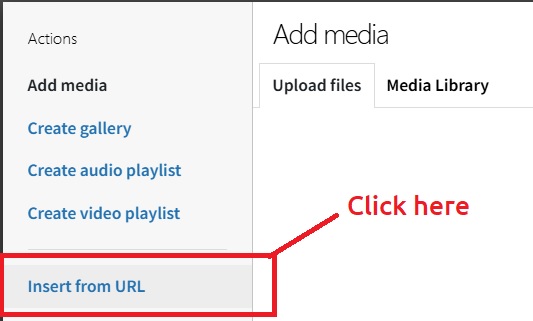
You can upload your videos directly to the product page as is, unless they are too large. In that case, upload them to your YouTube account first, then copy the video link from YouTube and paste it into Oz Robotics as follows: On the product page, click the Product Description box and select the location where you want your video to appear. Then, click the Add Media button.

From the opening page, click on the “Insert from URL” link below.
Copy the YouTube video link and paste it into the URL box below. Then click the “Insert into Post” link in the bottom-right corner.

Now, click the link in the bottom-right corner as follows.

Please add your Products and Shipping Fees based on these instructions: https://ozrobotics.com/instructions/
1. Sign in to My Account
2. Click on the Avatar image and upload your avatar in the opening box. Minimum Width: 400px, Height: 400, Format: .jpg or .png
Please DO NOT add your Website UR/link, Email Address, Phone Number, QR Code, Barcode, or Office Address on the product page via links or images for self-promoting. This is against our vendor policy.
If you can’t find the answer you’re looking for, please reach out to us via our Contact Us form or email us at partners@ozrobotics.com
Tips for Suppliers
-
Check your SPAM folder to ensure you accept emails from Oz Robotics
-
The faster you respond to our emails, the sooner we can process orders.
-
Add all your products to increase your chance of more sales.
-
Is your product marked Out of Stock?
-
Add your Products and Shipping Fees per our instructions to sell more.




















