
Frequently Asked Questions for Suppliers
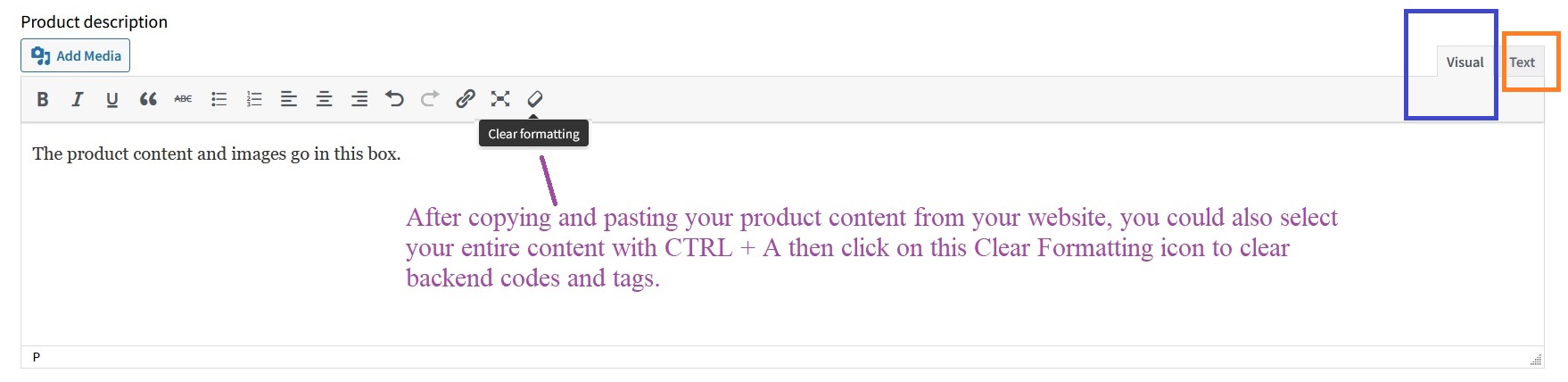
Copy and paste it into TEXT mode. This way, the backend HTML code and Tags will not be copied to our website. Then click VISUAL mode to ensure your product page renders correctly on Oz Robotics. Finally, you can add product images between paragraphs to make your product stand out. If you copy and paste directly into VISUAL mode, please press CTRL + A to select all, then click the Clear Formatting icon to remove any copied code and tags.
No, please do not add your website URL, email address, phone number, or office address on the product page via links or images. For videos, please use white-label product videos that do not include your website URL.
Your product price and shipping fees must match on Oz Robotics and on your website. e.g., if a product on your website is $100.00, Oz Robotics should also be $100.00. You cannot add our margin to your retail price or shipping fees on our website.
Save your product images in English, then upload them to Search Engines such as Google, Yahoo, and Bing to be indexed and made available to customers worldwide. Because most customers search for products in English, your online visibility will increase if your product images are saved in English, rather than in a format Google cannot read, such as Labpano-防摔壳one相机分开) .51.jpg. It will mark it as “Disapproved or invalid,” displaying “invalid image [image link]” and “There was an error accessing the image.”
The product featured image should be in .JPG or .PNG, and gallery pictures can be in .JPG, .PNG, or .webp format.
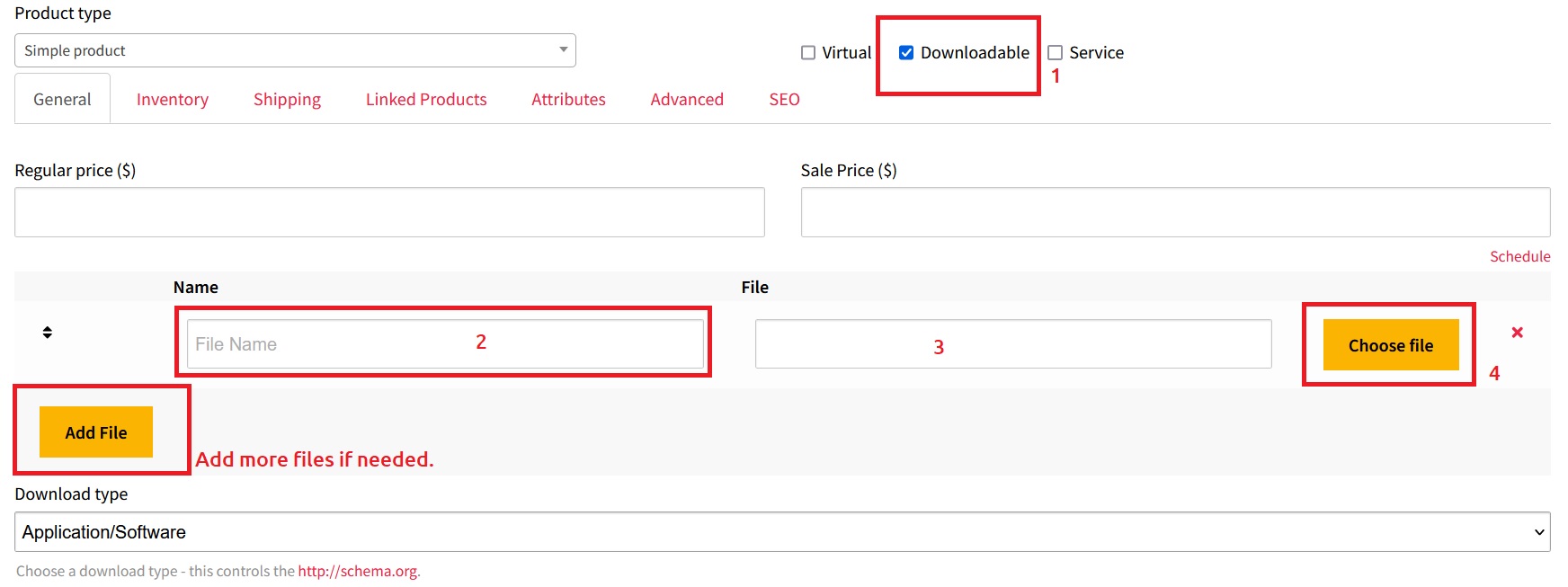
- Products Related Files: Please zip your product-related files, software, and manuals, then upload them to your product page for customers to download upon purchase. It will save time for everyone.
- Datasheets and manuals: You can upload as a PDF without compressing it, unless the file exceeds 5 MB.
Under SETTINGS, choose COUNTRY TABLE RATE or FLAT RATE. Then, within each product page, enter shipping fees for each COUNTRY or CONTINENT, and EVERYWHERE ELSE. Enter correct shipping fees to increase your sales and visibility!
You can use Flat Rate, Country Table Rate, or Free Shipping methods to sell with us. From your Vendor Dashboard, under SETTINGS, choose COUNTRY TABLE RATE or FLAT RATE and save. Then, within each product page, enter shipping fees or offer free Shipping for each COUNTRY or CONTINENT, and EVERYWHERE ELSE. Add an accurate shipping fee to make the product affordable for customers.
NOTE: If you do not want to enter shipping fees for every product and country separately with the Country Table Rate, then use the Flat Rate method from your Dashboard > Settings > Shipping > Shipping Type > Flat Rate, then enter your shipping cost in each box as:
-
Minimum shipping charge per order
-
Maximum shipping charge per order
-
Free Shipping if the order is over x amount
See how shipping fees affect your sales.
With Oz Robotics, you can sell all kinds of hardware, such as machinery, home and office equipment, robotics, drones, printers, scanners, STEM, AI, virtual reality, hoverboards, bikes, cars, mobile gadgets, innovative furniture, and all other techs and products listed below, but not limited to.
- Land, Air, and Water Products
- CNC Machines
- Mobile Gadgets
- Printers (all kinds)
- Home and Office Electronics
- Electrical Equipment, Electronic Kits, and Boards
- 3D Printed Models
- Miniature Kits
- Books (Hardcover, eBook, and Audio)
- Software, Website Themes, Plugins, Scripts, and Design Assets
- Virtual Reality and Augmented Reality Tech
- SaaS and Apps
- Freelancing, Engineering, and Manufacturing Services
- Sell all other hardware goods and innovations
If vendors have not set their store or shipping address, you will get the “No shipping methods found” message.
Your Product Name/Title should not exceed 70 characters and be in lowercase, starting with a capital letter. More info
Please never use the following symbols for Google and Organic SEO requirements in your product titles: ( ) { } [ ] & / \ : ” ” _ + *
If you can’t find the answer you’re looking for, please reach out to us via our Contact Us form or email us at partners@ozrobotics.com
Tips for Suppliers
-
Check your SPAM folder to ensure you accept emails from Oz Robotics
-
The faster you respond to our emails, the sooner we can process orders.
-
Add all your products to increase your chance of more sales.
-
Ensure your product isn’t marked as Out of Stock if it is in stock.
-
Add your Products and Shipping Fees per our instructions to sell more.



















