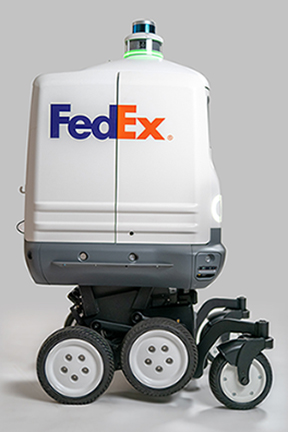
FedEx Delivery Robot

Roxo operates on sidewalks, bike lanes and roadsides, and is designed to be used in a three-to-five mile radius of a retailer’s location. We specifically designed Roxo for reliable, autonomous last-mile delivery that can deliver to a customer’s door, including climbing the curb, traveling up the sidewalk, and climbing deep terrace steps.

Further testing is being planned, targeting customer use cases like auto parts, pizza delivery, home improvement, general merchandise, and groceries.
More info

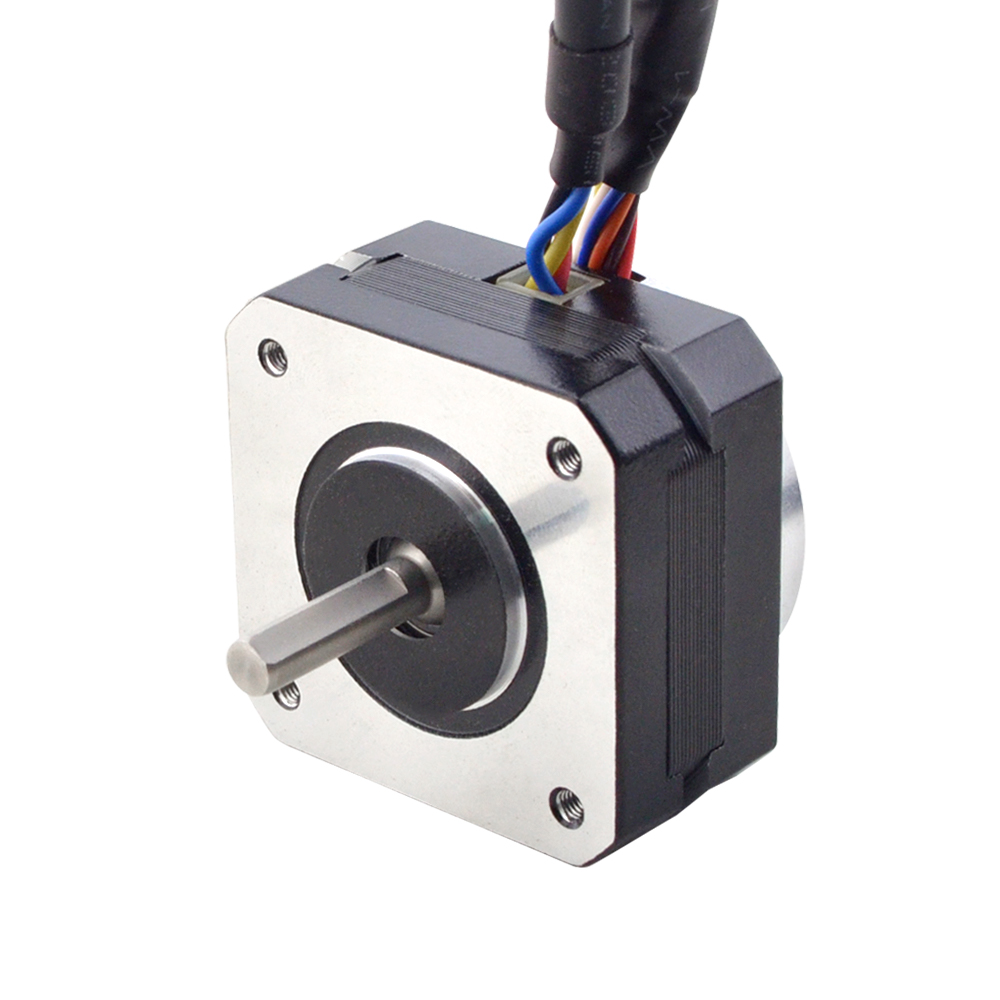
The Effect of Voltage on the Performance of Stepper Motors

Under different voltages, the performance of stepper motors will be different. Generally, the higher the voltage, the better the speed and torque performance of the stepper motor. However, increasing the voltage also causes an increase in current, which may overheat the motor and possibly even damage the driver.

The motor’s low-speed vibration will be larger when working under high voltage. We recommend that the driving voltage be selected according to the size of the motor base (but may be limited by the driver).

Motor Voltage
NEMA8—17 12-24VDC
NEMA23—24 24-48VDC
NEMA34 36-60VDC
NEMA42 60-100VDC

To properly drive a stepper motor at different voltages, the following points need to be considered:

Current: The stepper motor has a rated current, the best working current considered in the design. If the current exceeds the rated value, the electric
The machine may overheat and be damaged. At different voltages, the current may vary. To protect the motor, a current limit can be used
driver to control the current.

Driver: An appropriate driver must be used to drive the stepper motor at different voltages properly. The driver should be able to input
The voltage adjusts the output current to maintain a constant current. This can be achieved using a constant current source driver, which automatically adjusts the
output voltage to maintain a constant current.

In summary, stepper motors work at different voltages as follows: A change in voltage causes a change in current, so you need to use an appropriate driver to protect the motor and achieve optimum performance. When designing the system, the rated voltage and current of the motor should be considered, an appropriate driver should be selected, and control strategies should be used. Source

Kawasaki Robotics

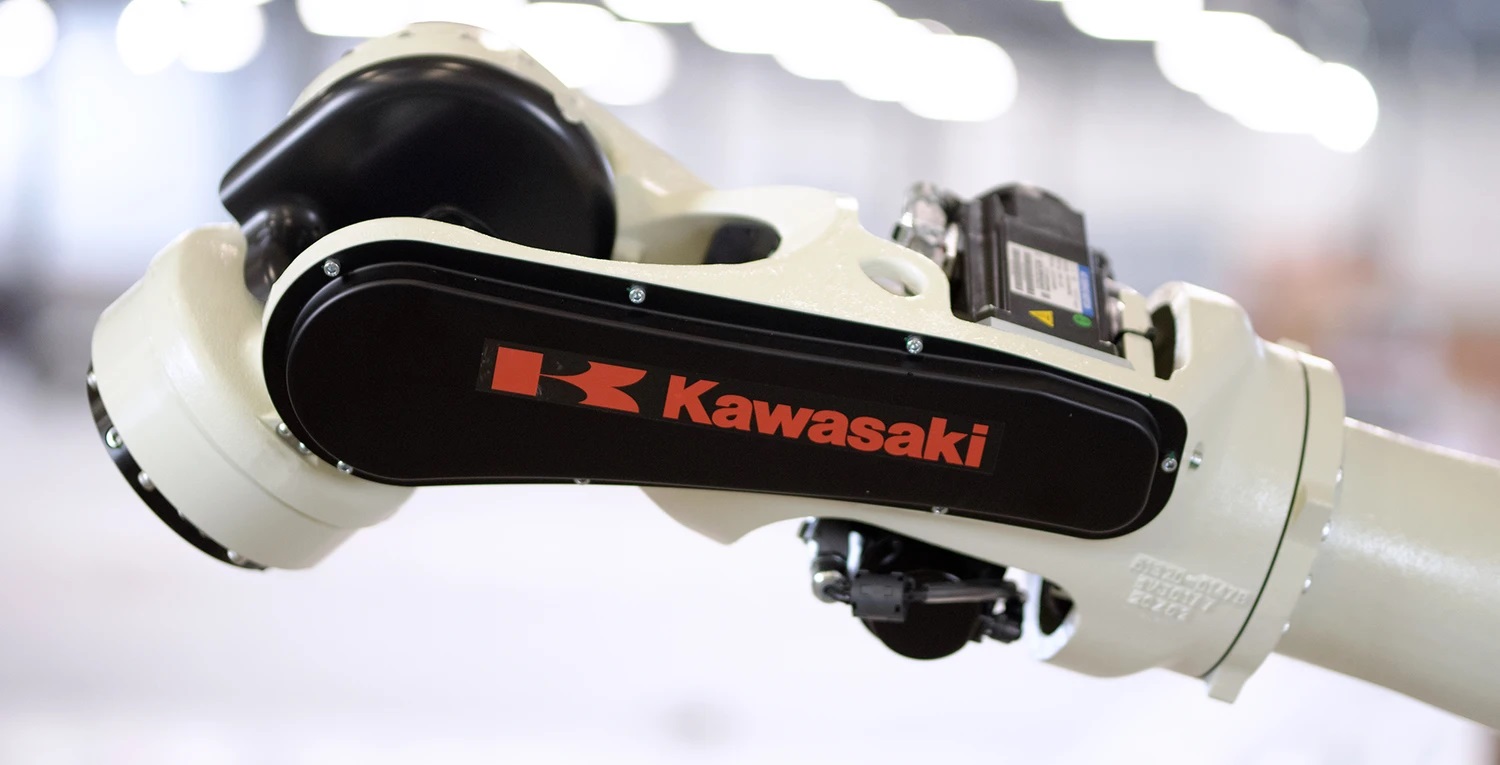
Kawasaki Robotics produced the first commercial, the industrial robot, in Japan in 1969


In 1969, Kawasaki Heavy Industries manufactured the first industrial robot in Japan. Since then, they have stood as one of the leading robot manufacturers, with their products used to develop automotive and other industries in Japan and around the world with their customers.

As a pioneer in industrial robot manufacturing, they have developed and supplied high-quality, high-performance robots for various applications such as welding, assembly, material handling, painting, and palletizing. Their robots work in diverse sectors, including the automotive, electrical, and electronics sectors, drawing on technologies and experience accumulated during decades of experience.

They offer solutions that meet consumers’ needs for automation, labor-saving efforts, enhanced productivity, quality, and the work environment.

Since 1878, Kawasaki Heavy Industries has manufactured products ranging from ships, planes, and motorcycles to industrial robot arms for automotive and general industries. Driven by decades of experience in manufacturing, they focused on creating industry-leading robots that they would want to use in their factories. As a result, Kawasaki Robotics is known for producing high-quality industrial robots that stand the test of time as manufacturing evolves.



See other Robot Brands


Motoman Robotics

Industrial Automation and Robotics Solutions

Founded in 1989, Yaskawa Motoman is one of the leading industrial robotics companies in the United States. With more than 500,000 Motoman industrial robots, 18 million servos, and 30 million inverter drive installed globally, Yaskawa provides automation products and solutions for virtually every industry and robotic application; including arc welding, assembly, coating, dispensing, material handling, material cutting, material removal, packaging, palletizing and spot welding.

Their product line includes more than 150 distinct industrial arms, delta, and SCARA robot models, plus a full line of pre-engineered “World” solutions that are complete application-specific robotic systems that include robot, process, and safety equipment. Combined with their sister and partner companies, they support robotic solutions worldwide. Their proven track record of delivering industry-leading quality, innovation, and customer satisfaction can help you exceed your automation goals.

Yaskawa Motoman is backed by a powerful parent, Yaskawa Electric Corporation of Japan. Since 1915, Yaskawa Electric has demonstrated a passion for automation by developing specialized solutions to help customers increase efficiency, improve quality, boost productivity, and deliver outstanding ROI. As one of the world’s largest manufacturers of industrial robots, Yaskawa Electric has offices in 29 countries and approximately 15,000 employees worldwide.


See other Robot Brands


Unboxing and Assembling a Magni Silver

Unboxing and Assembling a Magni Silver

The Magni comes almost ready to run. Two 12v SLA (Sealed Lead Acid) batteries should be purchased separately. A CR2032 coin cell battery is required for proper operation and must be installed on the back of the main controller board, as shown below.

A 4mm Allen wrench (for M6 screws) is included in the shipping box. In addition, a small Phillips (cross point) screwdriver may be needed for mounting the Raspberry Pi camera.

Opening The Box And Inspecting The Contents

Step 1 – open the box

Inside the box, you will find the battery cables, brackets for the cover plate, fasteners, and a cover plate.

Shipping Box

IMPORTANT! DO NOT DAMAGE THE THICK STYROFOAM THAT IS IN THE BOTTOM OF THE CHASSIS; THIS IS LATER USED TO HOLD THE BATTERIES

Components

After removing the robot, note the cover plate, which is stored at the bottom of the shipping box.

Cover plate

The Raspberry Pi 3 + SD image card can be installed if you have your image with your software (Silver and Gold). However, a default image may already have been installed in the factory.

Parts

In the small parts bags, you will find fasteners and M4 and M2 Allen wrenches that fit them. The additional sensors (Silver and Gold versions) are wrapped separately.

Bracket Installation

Motors to MC

The picture above shows a Magni as shipped without the two brackets. Take time to ensure that the two Motors are connected, which should have been done at the factory. If they are detached, there are arrows on the connectors that (-> <-) show the alignment. These connectors are sometimes hard to insert and separate because it’s hard to grip them. Each motor attaches to the black motor cable from the nearest side of the main PC board to that motor.

Front

The picture above shows a Magni without the front bracket. In this picture, the Raspberry Pi camera cable is attached to the Raspberry Pi itself, which is part of the setup for the Camera. Decide which camera configuration you will want on your Magni. You should now take a detour to look at THIS_PAGE and decide how to mount the Camera. Once you decide, use the camera setup page and look at the pictures on this page about bracket mounting.

 Front Bracket

Note that the front and back brackets are different. The front bracket has a shelf for mounting the Raspberry Pi camera. Using 3 of the M6 flat head hex drive screws, attach the bracket. The Allen wrench will go through the top side of the bracket to reach the screw. In this case, the forward-mounted Camera was selected, and the ribbon cable routed to the Camera. Again, see the camera setup page.

 Back Bracket Viewed From Behind

The back bracket attachment also uses 3 M6 flat-head hex drive screws. Here we see the three screws securing the back bracket to the main chassis.

The Mostly Assembled Magni Before Battery Install

The Front Bracket with the power switchboard and Camera mounted is shown above.

The Main Power switch is the black switch to the left above the first “U” in Ubiquity. On recent Switchboards, it will say ‘Main Power’ next to the blue LED.

The Motor Power is the red switch for the power to the wheels above the “y” of Ubiquity printed on the chassis. On recent Switchboards, it will say ‘Motor Power’ next to the red LED.

For both power switches, the ‘ON’ position is when the switch is out, and when pushed in, the switch will be ‘off.’

The charging port is between the two switches.

The next step will be to install the batteries. At this time, push both of the switches IN, which will turn all power off as you connect the batteries.

Main Power Battery And Wheel Cables Installation

First, a picture of a fully assembled Magni using 2 of the seven amp-hour batteries and having the motor cables attached for both wheels.

Use the thick styrofoam cutout piece that came with your Magni in the chassis bed. It holds the most common battery types in place even if the robot bumps things or is moved around.

The picture above shows proper cable connections for the batteries and wheels.

The wheels should be properly connected from the factory. As seen in this picture, notice that the cable attached to the two green terminal strips on the right of the back of the main MCB board goes to the right wheel. The cable that comes from the two green terminal strips seen on the left of the back of the MCB board goes to the left wheel.

Battery Power cable Connectors

The regular MCB power cables attached at the factory are set up to connect to SLA (Sealed Lead Acid) batteries using an F2 (6mm – 1/4 inch) male spade or flat connectors. Some smaller batteries may use the F1 (3/16 inch) male flat connector, and the cables we typically attach will work on those as well. We also include alternate power cables with 6mm loop connections for larger high-capacity batteries with bolts. Below is a picture of both connectors that a battery may require.

Two types of MCB to Battery Cable Connectors

Battery to MCB Power Cable details

For the main power cables, the red power cable goes to the positive of the battery on the right. The yellow cable connects the positive of the left battery to the negative of the battery shown on the right. The black cable goes from the negative terminal of the battery on the left to the ground on the robot.

There are cables for both spade-type and screw-type battery terminals. A 24-volt battery charger is included in the package (Photo not available). The recommended batteries are of the type specified by UB12xxx, where xxx specifies Amp Hours. Commonly UB1250, UB1290, or UB12150 are used. Since it is unknown what size and shape the batteries will be, it is the user’s responsibility to see they are secured in the chassis using straps or packing material.

The Motor cables to the Wheels

The wheels require a high-current cable that also holds the wheel encoder wires. This cable can be very difficult to detect and only slightly easier to install because it has a very tight fit. Below is a picture of the male pin end, and below that is a properly connected motor cable.

Take note of the small arrows, which can be hard to see, but mark the critical location, and the cables will only fit together if the two sides align the arrow markings.

Motor Cable Connectors

The Real-Time Clock Battery

Make sure to install the CR2032 real-time clock battery.

Flat Top Plate Install

The top plate should be the last thing attached, using 6 M6 machine screws. Notice that there is one 10mm or so hole in one corner of the plate that is meant to allow the Camera, if in an ‘upward’ position, to see the ceiling, so be aware of that as you put the top plate on the robot.

Note that the countersunk holes should be on the top.

Power Switches

Now you can turn your robot on by pressing the ON switch (the one colored BLACK) and following the guide on connecting to it.


Revision c91e495c.

Copyright (c) 2022, Ubiquity Robotics. BSD 3-Clause License

Batteries

The robot ships by air worldwide. The batteries are not included to keep shipping costs down, as they are difficult to ship worldwide, and safety restrictions vary by destination. The recommended lead acid batteries are easy to source locally.

An added advantage of not including batteries is that the robot accepts different battery sizes, so the user can select batteries depending on whether they prefer a long-endurance heavier robot or a short-endurance lighter robot. In short, you need to find your batteries to put in the robot, and these are commonly available online or in local stores that supply products for scooters, wheelchairs, uninterrupted power supply systems, or even automotive.

VOLTAGE CONNECTED TO THE MAIN CONTROL BOARD (MCB) MUST REMAIN 30.0V OR LESS AT ALL TIMES!

Specific Qualified Lead Acid Batteries

The robot requires two 12V lead acid-style batteries wired up in series to provide 24 volts, and typically, we recommend one of the choices in this section.

Battery Size Capacity (Ah) Runtime (hours) Notes
1250/1255 4 – 6 3 – 4 They are used when the portability of the robot is at a premium – for example if you are traveling by air with the robot.
1270 7 – 10 6 – 8 This size battery makes the robot still light enough to lift.
12350 30 – 35 12 – 24 It is recommended only for those who must have extraordinary endurance. This sized battery makes the robot sufficiently heavy that it will be difficult for most users to lift.

1270 Battery

A typical 1270 7.2Ah 12V battery, two of these are most commonly used with the Magni.

The stock battery charger we supply is ONLY FOR LEAD ACID batteries and will NOT work and may be dangerous for other battery technologies.

While any set of batteries that can together supply roughly 24V will work, the ideal battery type is a deep-cycle lead acid battery. Typically, for the smaller batteries (1250, 1255, 1270), a gel-type lead acid is common, and for the larger types (12350), an AGM type is more common. Li battery types will work, but it should be a drop-in replacement type fully compatible with a lead acid charging cycle and have its battery balancing system (typically LiFePO4). As the system is designed for lead acid batteries if you use anything else, the battery state topic could give misleading numbers as to the true battery state, but this will not affect the ability of the robot to drive properly.

Compartment Size

We ship Magni with a foam cut-out that nicely holds two 1270 format Lead Acid batteries. Do not discard the foam inserts along with the packaging.

The floor of the battery compartment is always at least 205mm x 258mm. Due to manufacturing tolerances, it may be larger, but that cannot be guaranteed.

From the floor to the top of the top rails on the side, we have 135mm of height. Batteries can go up taller to the top flat metal plate, and that would be a height of 184mm. These measurements are intentionally meant to avoid trying to get so close on a mm of clearance as our manufacturing cannot guarantee millimeter exact tolerances.

Typical Current Draw

Below is a table showing typical currents seen on the positive lead of the battery using a DC clamp on the meter for steady states.

Operating State DC Current in Amps
Stationary robot using the Pi4 with 4GByte and on flat ground with motor power off 0.4 – 0.45
Driving on a flat surface with no load at about 0.5 meters/sec 0.8 – 0.9
Rotating in place with no load (about the same as slow driving) 0.8
Stationary on flat ground with power to the motors 0.5 – 0.6
Stationary on flat surface but pushing down and back on the robot so wheels have to fight to stay in one place, but we are not slipping just yet 1.2
Place the robot so it cannot move and apply a great deal of torque to each wheel so the motor controller has to fight to hold the wheels firm. 2 – 3

The instantaneous currents can be well over ten amps in certain cases, but since these are transient cases for stress tests, they are not considered helpful for battery life calculations.

Other cases, such as the robot driving up a slope with large loads, of course, also increase current over the above values.

Real-time clock (RTC)’s CR2032

There is also a CR2032 coin cell battery on the back of the MCB. This provides power to the real-time clock, essential for timekeeping while the robot is without power or turned off. If this battery is not installed, obtain one and install it. Insert the battery with the lettering side up.

Coin cell clip

Capacity and Aging

Battery capacity is a complex topic, so we try to tell users a percentage that is based on brand new fresh batteries, as the Magni has no idea the state of the batteries that are in use and their age and past usage patterns.

All lead acid batteries lose their ability to hold a full charge over time and have a lower capacity after charging than a new battery and get to the total voltage that a new battery can attain as they age and have been through different levels of discharge and then re-charging cycles. The voltage curve should stay consistent throughout, so the percentage indicator should remain usable throughout its life span. However, they may no longer register as 100% charged, as they no longer charge to the same voltage level, and the idle current draw sags the voltage more than on new batteries.

General guidelines for lead acid gell cells commonly used on the Magni robots:

  1. Do not let your robot run under 50% capacity, around 24 V for the two magni batteries. Operating below that voltage level (2 V per cell) shortens the battery’s charge capacity and lifespan due to sulfation. Shutting down the Raspberry Pi is not enough as it will continue to draw notable current while off, so the robot must be completely turned off using the MCB switches.
  2. The MCB will disconnect the battery if the voltage drops below ~20 volts. This is a last resort to prevent complete loss of the batteries, as they should never reach this low charge level and will be seriously damaged. Due to battery voltage sag during high current operation, it’s also not possible to disconnect sooner. This abrupt cutoff may cause Pi SD card corruption.
  3. When used on old or damaged cells, the robot’s charger may cause slight overcharging if left connected after charge completion and can cause the batteries to vent gas (characterized by the smell of rotten eggs). If this happens, it is recommended not to keep the charger connected for longer than it takes the battery to charge.
  4. The MCB has a typical parasitic current draw of around 0.04 watts when connected (around 1-2 mA at 24 volts); as such, it will gradually empty the batteries even if completely turned off. It is recommended to completely disconnect at least one battery lead when the robot is in long-term storage (3 weeks or more).
Capacity Voltage for the 24 V Magni battery Voltage for a single 12 V battery
100% 25.77V 12.89V
90% 25.56V 12.78V
80% 25.31V 12.65V
70% 25.02V 12.51V
60% 24.81V 12.41V
50% 24.45V 12.23V
40% 24.21V 12.11V
30% 23.91V 11.96V
20% 23.61V 11.81V
10% 23.40V 11.70V
0% 23.25V 11.63V

Please consider this information when attempting to diagnose battery or charger faults.

Augmented Reality Glasses

Augmented Reality Technology Offers Endless Possibilities with Hands-Free Mobile Computing

ThirdEye RemoteEye – Hands-free mobile computing with endless possibilities. Ruggedized Military-based Technology for the Commercial and Consumer Worlds. A straight-out-of-the-box solution.

Hands-Free See-What-I-See

Livestream what the X2 Mixed Reality Glasses user sees to a remote expert. It is possible to stream device to device or device to the web. The powerful X Series 13-megapixel camera provides a clean and HD view.

Live AR Communication

Give instructions and assistance through the remote help platform with live point-of-view audio and video communication as if you are beside the X2 MR Glasses user. Give your employees the tools they need to perform at the highest level.

Screenshot & Annotate Life

Screenshot and annotate to provide help and guidance for your field worker. Save all recordings/screenshots into our secure database for future reference.

CAD Model

Generate a CAD model of whatever you are looking at through the X2 Mixed Reality Glasses quickly and with exceptional accuracy and connect to your existing infrastructure.

Real World Visualization

Overlay onto the real world to visualize your blueprint designs and concepts in 3D at a real-world location. Import a CAD design directly from your database. Get instant feedback from clients and stakeholders about your project.

See Product Details

Augmented Reality Technology

Augmented Reality Technology cost-free Software Platform Availability has been Extended

Over the next few months, ThirdEye will continue offering free software access to our remote assistance platform (RemoteEye) and our other software platforms for healthcare and field service! Purpose-built to create team cohesion among a remote workforce, RemoteEye allows teams to stay connected in new ways with an AR-enable platform. In this issue of ThirdEye’s weekly updates, we share valuable information about our cost-free software and our upcoming military technology event.

With ThirdEye’s expertise in augmented reality technology and long experience in developing solutions for the Department of Defense, military and other law enforcement units are transforming the future of public safety. While the outside public cannot attend ETI’s Tech-Palooza, discover how ThirdEye’s technology influences military and police work to reduce errors, create better collaboration, and save more lives.

Mixed Reality + Augmented and Reality Smart Glasses


Badass Robotics

We have always been passionate about technology, and we are here to stay!
We focus on what we love to do and what we know best. So we want you to know that Oz Robotics will always provide the latest products made by the most Creative Entrepreneurs for you to enjoy and build extraordinary innovations for all.

Augmented and Reality Smart Glasses

Create Safer Work Environments for Field Service Workers

With an attachable FLIR One Pro Thermal Sensor, the X2 MR Glasses bring real-time thermography to healthcare, engineering, and field service workers. The FLIR thermal camera has an accuracy of +/- 3 degrees Celsius and is used to detect elevated body temperatures and hazardous equipment/industrial machinery.

With an attachable FLIR One Pro thermal camera, ThirdEye’s X2 MR Glasses can generate real-time heat maps. The X2 MR Glasses have assisted emergency medical teams in detecting the coronavirus and elevated body temperatures in crowds of people. Did you know our X2 MR Glasses are also a valuable tool for field service workers? In this week’s update:

  • ThermalEye – Creating Safer Work Environments for Field Service Workers
  • The Future of Telemedicine
  • Improving Team Collaboration in Field Service
  • Fighting COVID-19 with Thermography & Augmented Reality
  • Download a Free Guide to AR + MR for Field Service
  • Get a Free MR Workspace Account

The Future of Telemedicine

Equipped with the X2s, healthcare professionals can communicate remotely with specialists, receive real-time instructions, diagnose patient problems, and provide better support during every patient visit more efficiently and completely hands-free.

ThirdEye’s Guide to AR & MR Enabled Telemedicine covers the following topics:
• MR Telehealth – An Alternative for In-person Medical Visits
• The Differences Between Telehealth and Telemedicine
• Remote Physician/Expert “See-What-I-See” Platform
• Battling COVID-19 with Hands-free Thermography
• HIPAA Compliance and Accessing Patient Records
• First Responders Saving More Lives with MR Wearables

Improving Team Collaboration in Field Service

Out of the box, ThirdEye’s X2 MR Glasses were engineered for remote collaboration and assistance. Each pair of X2s comes with a robust see-what-I-see platform that allows remote field techs to collaborate with subject matter experts in real time, anywhere in the world. In addition, techs can stream what they see and receive live feedback and instructions, all while working hands-free.


X2 Mixed Reality + Augmented and Reality Smart Glasses